
罫線
ReoGrid Web では、任意のセル範囲に罫線を適用できます。線のスタイル、色、幅、および罫線を適用する辺を制御できます。
Live Demo
RangeHandle API
range().border() で範囲に罫線を設定します。
const ws = grid.worksheet;

// sides 省略時は ['all'](外枠+内側全線)
ws.range('A1:D5').border({ style: 'solid', color: '#000000' });

// 特定の辺のみ
ws.range('A1:D1').border(
  { style: 'solid', color: '#1e40af', width: 2 },
  ['bottom']
);

// 複数の辺を指定
ws.range('A1:D5').border(
  { style: 'solid', color: '#d1d5db' },
  ['top', 'bottom', 'left', 'right']
);
BorderLineOptions
| プロパティ | 型 | 説明 |
|---|---|---|
style | 'solid' | 'dashed' | 'dotted' | 線のスタイル |
color | string | 線の色(CSS カラー) |
width | number | 線の太さ(px) |
ボーダーの辺
sides を省略すると ['all'](外枠+内側全線=グリッド全体)が適用されます。外枠のみに適用したい場合は ['outside'] を指定してください。
| 値 | 説明 |
|---|---|
'top' | 範囲の上辺 |
'bottom' | 範囲の下辺 |
'left' | 範囲の左辺 |
'right' | 範囲の右辺 |
'outside' | 外側全辺(top + bottom + left + right の一括指定) |
'insideV' | 内側の縦線(列間の区切り線) |
'insideH' | 内側の横線(行間の区切り線) |
'inside' | 内側全線(insideV + insideH の一括指定) |
複数の値を組み合わせて、1回の呼び出しで異なるスタイルを適用できます。
// 外枠 + 内側全線(グリッド全体に罫線)
ws.range('A1:D5').border({ style: 'solid', color: '#000000' }, ['outside', 'inside']);

// 縦の区切り線のみ
ws.range('A1:D5').border({ style: 'dashed', color: '#d1d5db' }, ['insideV']);

// 横の区切り線のみ
ws.range('A1:D5').border({ style: 'solid', color: '#e5e7eb' }, ['insideH']);
低レベル API
setRangeBorder
行・列インデックスを使って範囲に罫線を設定します。
ws.setRangeBorder(
  0, 0, 4, 3,  // topRow, leftColumn, bottomRow, rightColumn
  { style: 'solid', color: '#000000' },
  ['top', 'bottom']  // 省略時は ['all'](外枠+内側全線)
);
applyCellBorders
個別セルの罫線を Map で一括設定します。キーは 'row:column' 形式の文字列で、各罫線には width の指定が必要です。なお、この呼び出しは既存の罫線をすべて置き換えます。
const borders = new Map();
borders.set('0:0', {
  top: { style: 'solid', color: '#000000', width: 1 },
  bottom: { style: 'solid', color: '#000000', width: 1 },
});
ws.applyCellBorders(borders);
getCellBorder
const border = ws.getCellBorder(0, 0);
// { top?: BorderLine, bottom?: BorderLine, left?: BorderLine, right?: BorderLine }
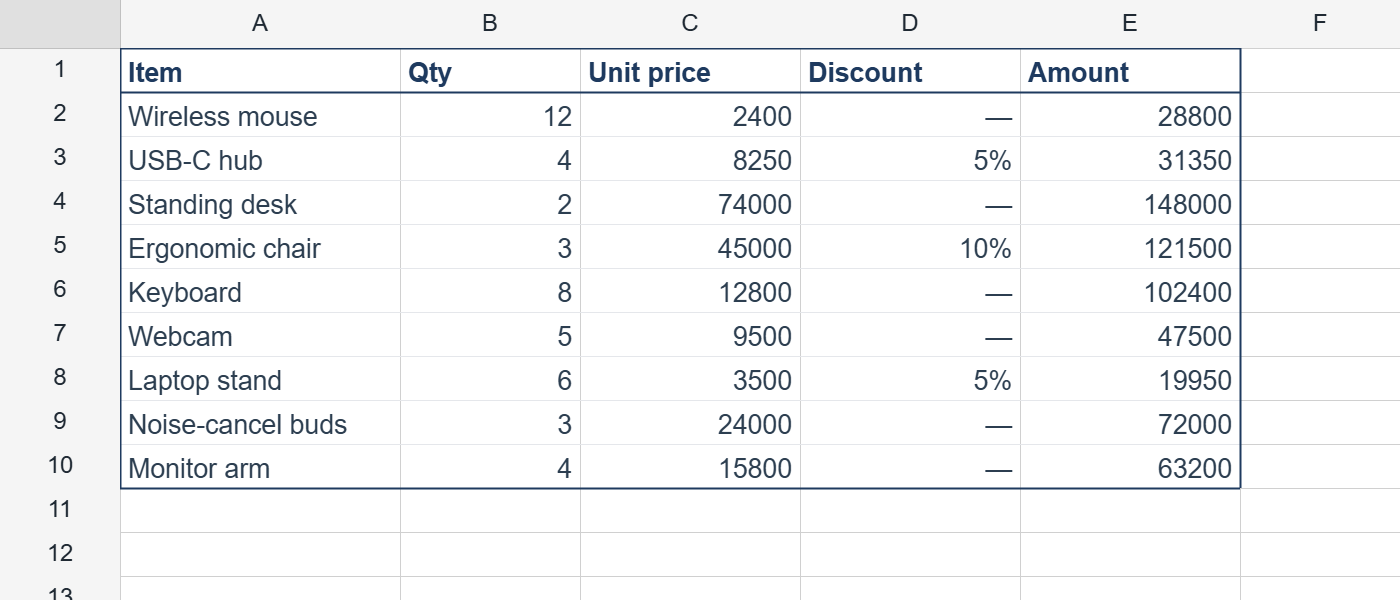
使用例 — ヘッダー付きテーブル
const ws = grid.worksheet;

// ヘッダー下線(太線)
ws.range('A1:E1').border(
  { style: 'solid', color: '#1e3a5f', width: 2 },
  ['bottom']
);

// データ行の区切り線
for (let r = 2; r <= 10; r++) {
  ws.range(`A${r}:E${r}`).border(
    { style: 'solid', color: '#e5e7eb' },
    ['bottom']
  );
}

// 外枠
ws.range('A1:E10').border(
  { style: 'solid', color: '#1e3a5f', width: 2 },
  ['outside']
);
実行結果
このページは役に立ちましたか? フィードバックありがとうございました。
弊社サイトの品質向上のため、コメントをご記入ください。