
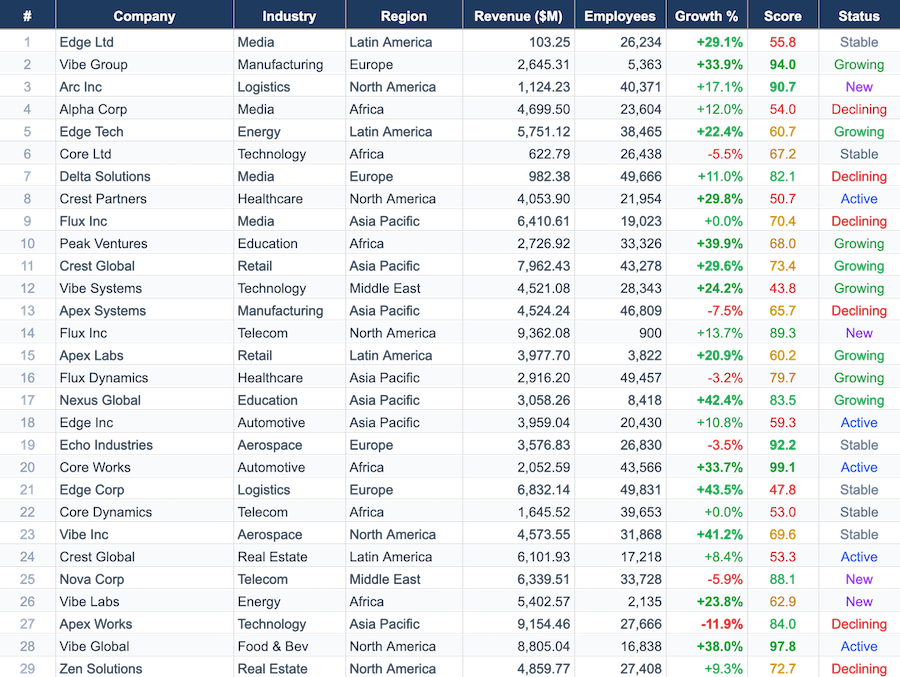
In our post about rendering 10,000 rows at 60fps, we included an honest disclosure section. One line read:
One million rows is out of scope.
We changed our mind. As of @reogrid/pro v1.2.2, this works:
worksheet.setDataSource({
  totalRows: 1_000_000,
  totalColumns: 10,
  async load(rows) {
    const res = await fetch(`/api/rows?ids=${rows.join(',')}`);
    return res.json(); // string[][] — one record per requested row
  },
});
The grid resizes to one million rows. The scrollbar represents all of them. Grab it, throw it to row 500,000, and the viewport fills in as fast as your server answers — in our demo with 100 ms of simulated network latency, that’s one fetch of ~200 rows and a single repaint.
The part worth a blog post is what doesn’t happen: the grid never loads, iterates, or even allocates the other 999,800 rows. After jumping around a million-row sheet for a while, the in-memory cell store in our test session held 611 rows out of 1,000,001.
Why a canvas grid gets this almost for free
DOM-virtualized grids (the AG Grid / Handsontable school) solved row windowing years ago: recycle DOM nodes for the visible rows, move them as you scroll. But in most of those architectures, virtualization is about rendering — the dataset itself still lives in client memory, or arrives through a purpose-built server-side row model that your backend has to implement.
ReoGrid Web’s renderer was already viewport-only. It is a single <canvas>; every frame walks the visible rectangle of the worksheet and draws it. Cell data lives in a sparse map — empty cells cost nothing. Rendering cost is O(visible cells) no matter how many rows the sheet declares.
So two of the three ingredients for a million-row sheet were already in place:
- Rendering never touches off-screen rows ✅
- Storage is sparse — declaring 1M rows allocates row-height bookkeeping (~16 MB of arrays), not cells ✅
- Data … was assumed to be loaded up-front ❌
The delay-load data source fixes the third. It is deliberately small: one interception point, one bookkeeping class, no separate cell store.
The API
import { createReogrid } from '@reogrid/pro';

const { worksheet } = createReogrid({ workspace: '#grid', licenseKey: '…' });

const handle = worksheet.setDataSource({
  /** Total dataset size — the grid resizes itself to this. */
  totalRows: 1_000_000,
  totalColumns: 10,

  /** Called with the row indices the grid needs, batched and deduplicated. */
  async load(rows) {
    const res = await fetch(`/api/rows?from=${rows[0]}&to=${rows[rows.length - 1]}`);
    return res.json();
  },

  /** Prefetch margin beyond the visible range (default 50). */
  bufferRows: 100,
});

// The handle:
handle.cachedRowCount;        // rows currently held in memory
handle.invalidateRows([42]);  // drop + reload specific rows
handle.invalidateAll();       // drop everything, reload the viewport
await handle.ensureVisible(); // resolves when the visible range is loaded
handle.detach();              // disconnect — loaded data stays in the sheet
Records can be dense arrays (string[], index = column) or sparse maps (Map<number, string>). The load callback can be synchronous if your data is already client-side — a million-row array in a worker, an IndexedDB store, a DuckDB-WASM result set.
detach() is deliberate about what it keeps: loaded data stays in the worksheet. That makes a useful recipe possible — load everything you care about, detach, and the sheet becomes a fully normal spreadsheet over that data (sortable, filterable, exportable).
How it works
The design borrows from ReoGrid’s .NET edition, which has had DataSourceLoadMode.LazyLoading for desktop apps backed by local databases. The web implementation is three moving parts.
1. One interception point
Every painted cell goes through the worksheet’s text lookup. The delay-load check sits at the top of it:
protected getCellText(row: number, column: number): string | null {
  if (this.delayLoadManager !== null && !this.delayLoadManager.isRowLoaded(row)) {
    this.delayLoadManager.requestRow(row); // schedule a fetch
    return null;                           // paint blank for now
  }
  // …normal path
}
When no data source is attached, the cost of this feature is one null check per cell read. There is no separate code path, no wrapper layer, no proxy.
2. Microtask-batched requests
A render pass calls getCellText for every visible cell — say 30 rows × 10 columns, synchronously, within one task. Firing a fetch per cell would be absurd; firing one per row, still bad. Instead, requestRow drops row indices into a Set and schedules a single flush with queueMicrotask:
- all rows touched in the same task land in the same batch,
- the microtask fires one
load()call with a deduplicated, sorted row list, - rows already loaded or already in flight are skipped.
When the records arrive, they’re written straight into the worksheet’s existing sparse cell map (no shadow store), and one repaint is scheduled — which, because rendering is requestAnimationFrame-batched, coalesces into a single frame.
In the demo, the initial paint of a 1,000,001-row sheet costs exactly one fetch: rows 0–127 (the visible ~28 rows plus a 100-row buffer).
3. Debounced prefetch on scroll
The render-path interception alone would work, but it only fetches what’s already on screen — you’d see a blank flash on every scroll. A scroll listener with a 16 ms debounce prefetches the visible range ± bufferRows, so slow scrolling never shows a blank cell, and a flung scrollbar settles with one batched range fetch rather than a request storm.
Two guards keep pathological cases in check:
- Flood guard. Select-all-copy iterates every row in the sheet. Without a cap, that’s a single million-row
load()call. Batches cap at 2,048 rows; rows beyond that simply load when they actually scroll into view. - Epoch invalidation.
invalidateAll()bumps an epoch counter; in-flight responses from before the bump are dropped instead of resurrecting stale data.
What about the features that scan the sheet?
This is the part where grid vendors usually go quiet, so let’s be explicit. A lazy grid pretends to have data it doesn’t. Every feature that scans the worksheet has to either block-and-fetch or give wrong answers — and we chose neither:
| Feature | Behavior with a data source attached |
|---|---|
| Formulas | Not supported over unloaded rows — delay-load sheets are display-oriented |
| Sort / AutoFilter | Require the data: load what you need, detach(), then sort/filter normally |
| xlsx / JSON export | Exports loaded rows only |
| Copy | Unloaded ranges copy as blanks (and won’t trigger a million-row fetch) |
| Editing | Works on loaded rows; edits to not-yet-loaded rows can be overwritten when their data arrives |
If your use case is “a million rows, each a formula” — no tool in a browser is going to save you, and we’d rather say so than demo our way around it.
The intended use case is the one that actually comes up: a large, server-backed dataset that users want to scroll, inspect, and spot-edit in a familiar spreadsheet UI — log tables, transaction histories, product catalogs, sensor data. For that shape of problem, the grid holds hundreds of rows of memory while presenting millions.
When you don’t need any of this
An easy mistake would be reaching for the data source at 50,000 rows. Don’t — the bulk loader is simpler and effectively instant at that scale:
| Dataset | Right tool | Cost |
|---|---|---|
| ≤ ~100k rows | bulkSetCells() | 100k × 10 cells load in ~350 ms, one event, one paint |
| ≥ ~100k rows, server-backed | setDataSource() | one fetch per viewport, ~constant memory |
| Unbounded / streaming | setDataSource() + invalidateRows() | refresh changed rows in place |
bulkSetCells keeps every feature fully functional — formulas, sort, filter, export — because the data is really there. The data source trades those for scale. Pick by dataset, not by excitement.
Try it
The delay-load data source ships in @reogrid/pro v1.2.2, and the live million-row demo is up — grab the scrollbar, throw it to row 500,000, and watch the fetch log coalesce requests:
npm install @reogrid/pro      # full features — setDataSource, formulas, export
npm install @reogrid/lite     # free — 100 rows × 26 cols, xlsx import
If you’re already using ReoGrid Web, nothing changes unless you call setDataSource() — the interception is a single null check until you do.
Previously in this series: how the canvas renderer holds 60fps on dense sheets, and importing real .xlsx files in the browser without a server.