
Fill a Report Template
Design a fixed-form report once — with {{token}} cells split into header / detail(×N) / footer bands — then bind data to materialize it in place. The result is plain cells, so paging, PDF export, xlsx, and formulas all keep working. Ideal for invoices and 帳票. Introduced in v1.4.
Pro only.
defineReportTemplate/bindReportrequire a validlicenseKey.
1. Design the template
Type literal text and {{token}} cells straight into the grid. A single-token cell keeps the bound value’s type (numbers stay numbers). In the detail band, {{#index}} (1-based row number) and {{#count}} (total records) are available:
import { createReogrid } from '@reogrid/pro';

const grid = createReogrid('#grid', { licenseKey: 'YOUR-LICENSE-KEY' });
const ws = grid.worksheet;

// Header
ws.cell('A1').setValue('Invoice');
ws.column(1).width = 200;  // room for the item names the detail band writes
ws.cell('A3').setValue('No:');     ws.cell('B3').setValue('{{invoiceNo}}');
ws.cell('A4').setValue('Date:');   ws.cell('B4').setValue('{{date}}');
ws.cell('A5').setValue('Bill to:'); ws.cell('B5').setValue('{{customer.name}}'); // dotted paths ok

// Detail band — one design row, repeated per item
ws.cell('A7').setValue('{{#index}}');
ws.cell('B7').setValue('{{name}}');
ws.cell('C7').setValue('{{qty}}');
ws.cell('D7').setValue('{{price}}');
ws.cell('E7').setValue('=C7*D7');    // per-row formula — relative refs shift per record

// Footer
ws.cell('D9').setValue('Total');
ws.cell('E9').setValue('=SUM(E7:E7)'); // aggregate expands over the materialized detail range
2. Define the sections
Describe which 0-based, inclusive design rows belong to each band. Sections are contiguous; a detail section names the array field in the data via source:
ws.defineReportTemplate({
  columns: [0, 4], // A:E — the materialized column range
  sections: [
    { role: 'header', rows: [0, 5] },
    { role: 'detail', rows: [6, 6], source: 'items', pageBreakEvery: 20 },
    { role: 'footer', rows: [7, 9] },
  ],
});
pageBreakEvery: N pins a manual page break after every N materialized records (handy for fixed-form 帳票). keepTogether (default true) never splits one record across a page boundary.
3. Bind the data
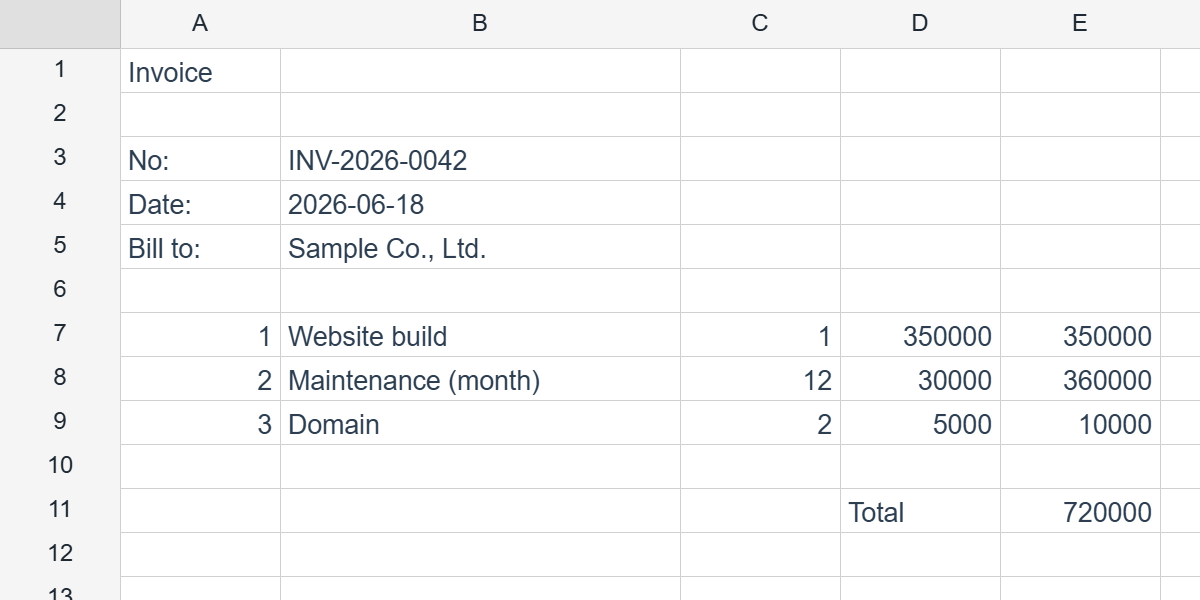
Top-level fields feed header/footer tokens; each array field (keyed by a detail’s source) drives the repeating band. The detail expands vertically — rows shift down, columns never move:
ws.bindReport({
  invoiceNo: 'INV-2026-0042',
  date: '2026-06-18',
  customer: { name: 'Sample Co., Ltd.' },
  items: [
    { name: 'Website build',       qty: 1,  price: 350000 },
    { name: 'Maintenance (month)', qty: 12, price: 30000 },
    { name: 'Domain',              qty: 2,  price: 5000 },
  ],
});

// Undo the expansion, restoring the template view:
ws.unbindReport();
Per-row formulas relative-shift for each record, and footer aggregates like =SUM(E7:E7) expand to cover the full materialized detail range.
The grid.report handle
The same operations are available on grid.report, scoped to the active sheet:
grid.report.define({ /* ReportTemplateSpec */ });
grid.report.bind({ /* ReportData */ });
grid.report.unbind();
grid.report.get();   // ReportTemplateSpec | null
grid.report.state(); // 'none' | 'template' | 'bound'
Lite-readable equivalents on the worksheet: ws.getReportTemplate() and ws.getReportState().
Pair with PDF export
Because the bound report is plain cells, pipe it straight into a print-perfect PDF — a full browser-side invoice/report pipeline:
import { preloadPdfFont } from '@reogrid/pro';

await preloadPdfFont('ja');
grid.saveAsPdf({ locale: 'ja', usePageBreaks: true, filename: 'invoice.pdf' });
See also
Sorry to hear that. What could be improved?